Objective
In this lab, you will develop a fuzzer for testing C programs. Fuzzing is a popular software testing technique wherein the program under test is fed randomly generated inputs. Such inputs help uncover a wide range of security-critical and crashing bugs in programs. For this purpose, your fuzzer will begin with seed inputs, and generate new inputs by mutating previous inputs. It will use output from previous rounds of test as feedback to direct future test generation. You will use the code coverage metrics you saw in Lab 2 to help select interesting inputs for your fuzzer to mutate.
You will extend and evaluate this fuzzer through three components:
- Implementing research ideas: build a static dictionary and apply its tokens using ideas from Static Program Analysis as a Fuzzing Aid, implement the comparison-tracing stage of REDQUEEN, and assign mutation budgets using AFLFast.
- LLM-generated seeds: use a large language model (LLM) to generate a varied JSON seed corpus, validate it, and submit it with your fuzzer.
- Real-world case studies: evaluate your fuzzer on the provided JSON parser and compare baseline coverage with coverage using your submitted seeds. The grader also evaluates generalization on three hidden libraries.
Pre-Requisites
- Watch the video lectures corresponding to the module on “Random Testing”. The lectures introduce various terminology used throughout this lab such as seed inputs, mutations, and feedback-directed testing.
- Read the three papers below. Each implements a mechanism that you will adapt in this lab; the corresponding section under Lab Instructions says which parts of each paper to focus on and specifies the exact scope, interfaces, and byte formats of the adaptation.
| Paper | Mechanism implemented in this lab |
|---|---|
| Shastry et al., Static Program Analysis as a Fuzzing Aid, RAID 2017 | Extract dictionary tokens from program code and use them in insertion/overwrite mutations |
| Aschermann et al., REDQUEEN: Fuzzing with Input-to-State Correspondence, NDSS 2019 | Trace the operands of executed comparisons using LLVM instrumentation |
| Böhme, Pham, and Roychoudhury, Coverage-based Greybox Fuzzing as Markov Chain, CCS 2016 | Apply the FAST power schedule to allocate mutations to a selected seed |
Setup
The code for Lab3 is located under cis547vm/lab3. We will frequently refer to the top level directory for Lab 3 as lab3 when describing file locations for the lab. Open the lab3 directory in VSCode following the Instructions from Course VM document
This lab builds off the code coverage instrumentation from Lab 2. You are provided with an InstrumentDivision.cpp file in lab3/src; it contains two instrumentations, namely coverage and sanitize. You have already seen code coverage in the previous lab and the implementation here is identical to it. In lab 1, you have seen that when a program encounters a divide-by-zero error it causes a Floating Point Exception and leads to a core dump. The sanitizer instrumentation inserts a call to the __sanitize__ function before every division instruction. This function gracefully exits the program with return code 1 if the denominator is zero, otherwise the program continues running normally. The provided pass performs the zero comparison at the denominator’s native integer width, including for 64-bit divisions, before calling the runtime.
Step 1. Build the fuzzer and instrumentation
The fuzzer and instrumentation are built using CMake. First, create a build directory and build each component manually:
lab3$ mkdir build && cd build
lab3/build$ cmake ..
lab3/build$ make
After running make, you should notice FuzzingAnalysis.so, libruntime.so, and fuzzer in lab3/build. The fuzzer is the tool that will feed randomized input (that you will generate) to a compiled C program that was instrumented to exit gracefully when it hits a Divide-by-Zero error and report code coverage during execution.
For later builds, you can run the same CMake steps from the top-level lab3 directory with make build.
Step 2. Prepare a test program
Next, we want to prepare a test program to fuzz with the fuzzer. This will be done by first compiling it to LLVM IR, instrumenting the IR as in Lab 2, and then linking the instrumented program with the runtime. Run each step manually once:
lab3/test$ clang -emit-llvm -S -fno-discard-value-names -c -o sanity1.ll sanity1.c -g
lab3/test$ opt -load-pass-plugin=../build/FuzzingAnalysis.so -passes="FuzzingAnalysis" -S sanity1.ll -o sanity1.instrumented.ll
lab3/test$ mv fuzzing_dict fuzzing_dict_sanity1
lab3/test$ clang -o sanity1.out -L../build -Wl,-rpath,../build -lruntime -lm sanity1.instrumented.ll
The result is sanity1.out, along with its LLVM IR and the extracted fuzzing_dict_sanity1/ directory. The supplied test Makefile performs the same steps. Use the original target name to build just sanity1, or all to build every public target:
lab3/test$ make sanity1
lab3/test$ make all
Step 3. Run the fuzzer
You may recall from lab 1, that AFL could generate new inputs forever and never stop running. This is also the case for your fuzzer. So for this we will use timeout to stop the fuzzer after a specified time.
First, create the output directory where the fuzzer will store its results:
lab3/test$ mkdir fuzz_output_sanity1
Then run your fuzzer on sanity1.out for one second. The options below match the supplied config.txt and use the dictionary extracted above:
lab3/test$ timeout 1s ../build/fuzzer ./sanity1.out fuzz_input fuzz_output_sanity1 \
  --freq 1000 --seed 42 --dict fuzzing_dict_sanity1
The ./ before sanity1.out is required so the fuzzer can find the executable. The seed setting controls the random-number generator, while freq controls how often the fuzzer writes a non-crashing input (larger values are less frequent).
For later runs, test.sh removes and recreates the output directory and reads the random seed and feedback frequency from lab3/config.txt:
lab3/test$ ./test.sh sanity1 1s
You can also use the Makefile to build the target and run the harness for ten seconds:
lab3/test$ make fuzz-sanity1
Either way, the results are stored in lab3/test/fuzz_output_sanity1. Once you have run the fuzzer you should expect to see the failure directory get populated with several randomly generated inputs that crash sanity1.c. You may also see some of the randomly generated inputs that don’t cause a crash under the success directory.
fuzz_output_sanity1
├── success         # Some of the generated inputs that didn't cause a crash.
│   ├── input0
│   └──  ...
├── randomSeed.txt  # The seed that was used to generate random numbers.
└── failure         # All the generated inputs that cause a crash.
    ├── input0
    ├── input1
    │    ...
    └── inputN
Here N is the last case that caused a crash before the timeout.
Lab Instructions
A full-fledged fuzzer consists of three key features:
- test case generation matching the grammar of the program input,
- strategies to mutate test inputs to increase code coverage,
- a feedback mechanism to help drive the types of mutations used.
Overview of the Tasks
The implementation work is in src/Fuzzer.cpp, src/Utils.cpp, src/BuildDictionary.cpp, src/DictionaryMutation.cpp, src/InstrumentComparisons.cpp, and src/PowerSchedule.cpp. It falls into three parts, and the sections below walk through them in the same order.
Part 1: the core fuzzer (src/Fuzzer.cpp and src/Utils.cpp)
- Implement
selectInput, which selects a parent string from theSeedInputsvector. - Implement mutation functions that help your fuzzer generate a rich variety of strings, and implement
selectMutationFnto decide which mutation function to pick. - In
feedback, decide whether a mutation was interesting based on the success or failure of the program and its code coverage, and insert interesting mutants intoSeedInputsto drive further mutation. - Make sure
runTargetpasses every generated input to the target program correctly.
Part 2: the paper adaptations
- Paper 1: implement constant extraction to build a dictionary of keywords (
src/BuildDictionary.cpp), implement the dictionary application contract inapplyDictionaryEntry(src/DictionaryMutation.cpp), and use it from the dictionary-driven mutations. - Paper 2: instrument supported comparisons and pass their runtime operands to the provided logging hooks (
src/InstrumentComparisons.cpp). - Paper 3: implement the FAST energy rule and shared scheduling state (
src/PowerSchedule.cpp), and spend the mutation budget infuzzOneBatch.
Part 3: seeds and real-world evaluation
- Use an LLM to generate JSON seeds, review and validate them, and place the final corpus in
json_seeds/. - Run the public JSON case study and compare baseline and submitted-seed coverage in the grader’s real-world evaluation.
Each paper adaptation has a public make check-* target, described in its section, that exercises the required behavior on a fixed input.
Mutation-Fuzzing Primer
Consider the following code that reads some string input from the command line:
int main() {
  char input[65536];
  fgets(input, sizeof(input), stdin);
  int x = 13;
  int z = 21;

  if (strlen(input) % 13 == 0) {
    z = x / 0;
  }

  if (strlen(input) > 100 && input[25] == 'a') {
    z = x / 0;
  }

  return 0;
}
We have two very obvious cases that cause divide-by-zero errors in the program:
- If the length of the program input is divisible by 13, or
- if the length of the input is greater than 100 and the 25th character in the string is an
a.
Now, let’s imagine that this program is a black box, and we can only search for errors by running the code with different inputs.
We would likely try a random string, say "abcdef", which would give us a successful run. From there, we could take our first string as a starting point and add some new characters,"ghi", giving us "abcdefghi". Here we have mutated our original input string to generate a new test case. We might repeat this process, finally stumbling on “abcdefghijklm” which is divisible by 13 and causes the program to crash.
How about the second case? We could keep inserting characters onto the end of our string, which would eventually get us some large string that satisfies the first condition of the if statement (input length greater than 100), but we need to perform an additional type of mutation — randomly changing characters in the string — to eventually satisfy the second condition in the if statement.
Through the use of various mutations on an input string, we were able to exhaust all program execution paths, i.e., more varied mutations in the input increased our code coverage. In its simplest form, this is exactly what a fuzzer does. You may take a look at the Mutation-Based Fuzzing chapter in the Fuzzing Book.
Feedback-Directed Fuzzing
We’ve seen how randomized testing can find bugs and is a useful software analysis tool. The previous section describes a brute force generation of test cases; we simply perform random mutations hoping that we find a bug. This results in a lot of test cases being redundant, and therefore unnecessary.
We can gather additional information about a program’s execution and use it as feedback to our fuzzer. The following figure shows at a high level what this process looks like:
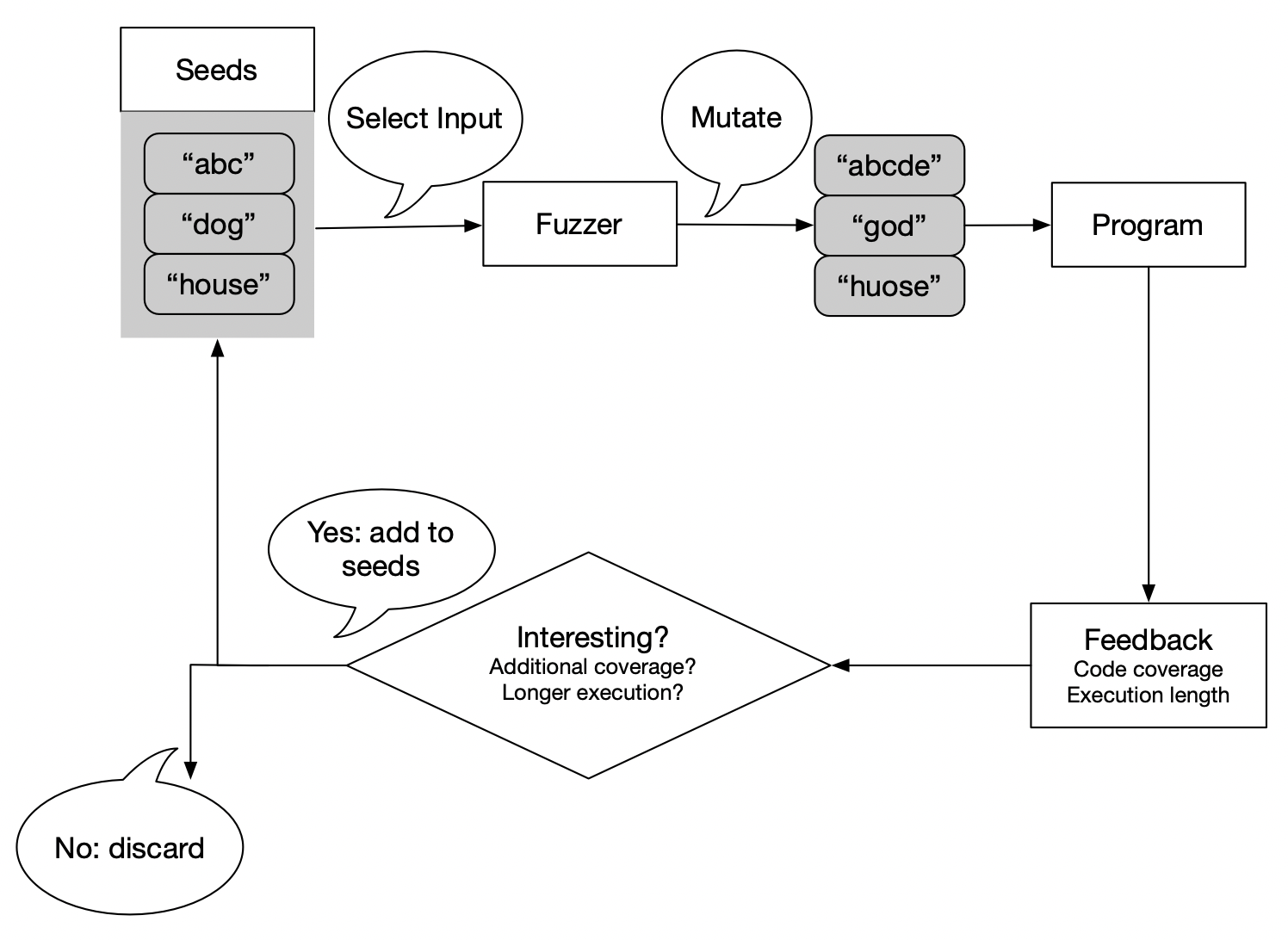
Generating new, interesting seeds is the goal of feedback directed fuzzing. What does interesting mean? We might consider whether a test increases code coverage. If so, we have found new execution pathways that we want to continue to explore. Another test might significantly increase program runtime, in which case we might discover some latent performance bugs. In both cases, the tests increased our knowledge of the program; hence, we insert these tests into our set of seeds and use them as a starting point for future test generation.
Feel free to check out the Greybox Fuzzing chapter in the Fuzzing Book.
Building the Fuzzer
In this lab, you will modify src/Fuzzer.cpp to build a coverage guided fuzzer. You’ll need to implement some variety of mutation functions; a mutation function takes a string, performs some mutation on it, and returns the mutated string. You will have to decide which mutation strategies to choose and you will implement your logic in selectMutationFn. It may help to look at the test programs in test/ to see what sort of programs your fuzzer would have to explore to find bugs, and what sort of mutations you might want to perform.
The fuzzer will start by reading input files from the input directory specified on the command line to initially populate the SeedInputs vector. After that, it will need to select a particular input from the SeedInputs vector and a mutation function that will be used to mutate it. For this, you will need to implement your logic for selectInput, and selectMutationFn respectively. The fuzzer first executes each distinct initial seed once to record its coverage. For each later seed selection, it obtains an energy budget from the power scheduler (see Paper 3) and generates that many mutations from the selected parent. It may choose a different mutation function on each iteration. The mutated input will be run on the target program, and feedback will be provided based on the coverage of that run. Using this coverage, you will then decide if this is an interesting seed and insert it into the SeedInputs vector if you find it so. This allows the mutated input to be picked later on and be further mutated. This process continues until the fuzzer gets interrupted (via timeout, or on the terminal by Ctrl+C).
The following pseudo-code illustrates this logic:
readSeedInputs(SeedInputs)                // Initialize SeedInputs
calibrateSeedInputs(Target, OutDir)       // Record initial coverage and frequency

while (true) {
  input <- selectInput()                 // Pick one parent
  energy <- PowerScheduler.nextEnergy(input)
  repeat energy times {
    mutation <- selectMutationFn()
    mutatedInput <- mutation(input)      // Always start from the chosen parent
    test(Target, mutatedInput)
    feedBack(Target, mutatedInput)       // Account for every execution
  }
}
Refer to fuzz and fuzzOneBatch in src/Fuzzer.cpp for this logic.
Code Coverage Metric
Recall that you have a way of checking how much of a particular program gets executed using the coverage information output by the instrumentation. A .cov file will get generated in the working directory for the program that is getting fuzzed. This file is read and is made available to you through RawCoverageData variable inside the feedback function. You can then use it to decide if a particular mutation is interesting.
Possible Mutations
The following is a list of potential suggestions for your mutations:
- Replace bytes with random values.
- Swap adjacent bytes.
- Cycle through all values for each byte.
- Remove a random byte.
- Insert a random byte.
We also give placeholders for two dictionary-driven mutations, mutationDictDeterministic and mutationDictRandom. Use applyDictionaryEntry (see Paper 1) to apply their chosen tokens.
Feel free to play around with additional mutations, and see if you can speed up the search for bugs on the binaries. You may use the C++ function rand() to generate a random integer.
You will notice that different programs will require different strategies, or that in some cases you may even have to switch between different mutation strategies in the middle of the fuzzing process. You are expected to include a mechanism that will try to choose the best strategy for the input program based on the coverage feedback.
A Few Tips
Read through the Notes, Hints, and Comments in Fuzzer.cpp file before you start, to get a better idea of how everything fits together.
Start small. Implement one mutation strategy at a time and try to crash the easier test cases first before moving to harder ones. Once successful, you can move on to implementing more strategies and more sophisticated ways of choosing between them based on the feedback you get.
Do not be afraid to keep track of any state between rounds of the fuzzing.
You may want to try each of your mutation strategies initially to see which one generates a test that increases code coverage, and then exploit that strategy.
Paper 1: Static Program Analysis as a Fuzzing Aid
Fuzzing dictionaries are lists of keywords and magic numbers that guide fuzzers toward generating more meaningful test inputs. Dictionary-guided fuzzing incorporates domain-specific knowledge to increase the likelihood of triggering interesting program behaviors. These dictionaries might contain file format signatures (for a image processing library), keywords (for a compiler), and more. Dictionaries can significantly improve code coverage and bug-finding ability compared to less-informed approaches.
Static analysis offers an opportunity for automatically extracting dictionary entries from target programs. We can analyze the LLVM IR to identify string literals, integer constants, and comparison operands. For instance, if the code contains a comparison like if (header == 0xFEED), static analysis can extract 0xFEED and add it to the fuzzing dictionary. This automated extraction process can discover constants that would be nearly impossible for random fuzzing to generate.
We can also extend the dictionary with position hints, specifying where certain tokens should appear. These hints might indicate that certain magic bytes must appear at specific offsets. By encoding positional constraints alongside the dictionary tokens themselves, we can more efficiently generate structurally valid inputs.
Shastry et al. use static analysis to infer useful input constructs and supply them to dictionary-driven mutations. Focus on Sections 3.1–3.2 of the paper and its dictionary-mutation algorithm. Implement a local LLVM IR adaptation of this workflow, including the dictionary application task below. The paper’s Orthrus prototype uses Clang AST queries and broader interprocedural analysis; the lab specifies local extraction rules. Position hints, integer-neighbor rules, and the exact output format below are course-specific requirements.
Building the Dictionary
Modify src/BuildDictionary.cpp to implement a local LLVM analysis that automatically builds a dictionary for your fuzzer. The pass must write a flat fuzzing_dict directory. Each file is named entry_N for an unpositioned token or entry_N@offset for a token that should be placed at the given nonnegative byte offset. File contents are the raw token bytes; they are not text escapes or C strings. The index N and enumeration order have no semantic meaning.
Your dictionary construction must implement the following behavior:
- Extract flat global
[N x i8]initializers. Think about how a C string literal ends up as a global array in LLVM IR, and what that implies about a trailing byte you probably don’t want in the dictionary. - For
icmpinstructions overi8,i16,i32, ori64, serialize constants in the byte order declared by the module. Equality and inequality comparisons contribute the exact constant. Ordered comparisons (<,<=,>,>=) tell a fuzzer about a boundary rather than a single value; consider which constants nearCare worth contributing, and how to avoid wrapping at the type’s signed or unsigned limits. - Extract every explicit
switchcase value. The default destination does not contribute a value. - Recognize direct calls to
strcmp,strncmp,memcmp, andstrstr, including constant operands reached through constant GEPs and pointer casts. These four functions don’t all agree on how much of the constant operand is meaningful. Check each function’s signature and NUL-termination behavior — in particular,strncmptakes a length argument as well as two pointers. - Attach a position hint only for the documented local cases: an
i8loaded directly (and optionally extended once) from a constant-offset GEP into a local byte-array allocation, or a direct constant-offset input-buffer argument tostrcmp,strncmp, ormemcmp. Entries whose positions cannot be established locally must remain unhinted.strstrentries are unhinted.
An offset into a constant operand selects the source bytes of a token. The input-buffer offset determines its position hint. For example, memcmp(buf + 5, "xxMAGIC" + 2, 5), with buf satisfying the local rules above, contributes token MAGIC with position hint 5. The offset 2 slices the constant and does not describe where the token belongs in the fuzz input.
You may emit additional entries when they obey the format. Every entry must be between 1 and 1024 bytes, every hint must be a nonnegative decimal integer, and the output must not contain duplicate (bytes, hint) pairs. Your implementation must remain bounded and must not create links, directories, or unrelated files inside fuzzing_dict.
PHI nodes, selects, dynamic offsets, aliases, wrapper functions, nested aggregate initializers, interprocedural reasoning, and general provenance tracking are outside the required scope.
The plugin exposes two new-pass-manager pipelines. BuildDictionary runs only dictionary construction, while FuzzingAnalysis retains the combined dictionary-and-instrumentation behavior used by the provided test Makefile. The starter helper functions compile but are only scaffolding; the behavior specified above is required.
You can build the lab and run a representative public semantic check with:
lab3$ make check-dictionary
The check runs BuildDictionary on test/dictionary_public.ll, validates the directory and entry bounds, normalizes entries as (raw bytes, optional hint), and checks representative globals, integer boundaries, switches, comparison calls, binary slices, and local hints. Additional well-formed entries are permitted.
Applying Dictionary Entries
The paper’s mutation algorithm consumes extracted dictionary entries through insertion and overwrite. Implement this step with the explicit byte semantics below so that extraction and application can be checked separately.
Implement instrument::applyDictionaryEntry in src/DictionaryMutation.cpp and use it from your dictionary mutation strategies in src/Fuzzer.cpp. Keep its declaration in include/DictionaryMutation.h unchanged, and keep the operation self-contained: it receives the input, dictionary entry, offset, and insertion/overwrite choice as arguments, and must not depend on the fuzzer’s global state or randomness.
The application contract is:
- A position hint overrides the supplied offset, including when the hint is zero. Without a hint, the offset must be between zero and the input length, inclusive; larger offsets return the original input unchanged.
- When a hint is beyond the input’s end, pad to that position with NUL bytes before applying the token.
- Insertion puts the entire token at the selected position and preserves the original suffix. Overwrite replaces up to the token’s length starting at that position, extending the input if necessary. Both operations accept an empty input and a position exactly at the end.
- Preserve every byte in both the input and token, including embedded/trailing NULs and bytes above
0x7f. - Tokens must contain 1 through 1024 bytes. The original and resulting inputs must each be at most 64 KiB. Invalid tokens, oversized original inputs, or operations exceeding that limit return the original input unchanged, with no padding or partial mutation. Check bounds before adding sizes, converting position hints, or allocating memory; hints may span all of
uint64_t.
For example, inserting XY into abcd at offset 2 produces abXYcd; overwriting at that offset produces abXY. Overwriting with XYZ at offset 3 produces abcXYZ. A token Z hinted at offset 3 applied to a produces the four bytes a, NUL, NUL, Z.
Run a representative public check with:
lab3$ make check-dictionary-application
Strategies remain free to select entries, offsets, and insertion/overwrite modes. A strategy can explicitly discard a hint when exploring another position by passing a copy with positionHint = std::nullopt.
Paper 2: REDQUEEN Comparison Tracing
Aschermann et al.’s REDQUEEN observes comparison operands to support input-to-state correspondence. Focus on the tracing stage in Section III-A of the paper and how its observations support input-to-state correspondence. Implement that stage using LLVM instrumentation: ComparisonLogging in src/InstrumentComparisons.cpp calls the provided runtime in lib/cmplog.c to record both operands of comparisons that execute. Preserve their pairing, including values computed at runtime. The CmpLog documentation provides related practical background.
This task grades operand collection. REDQUEEN’s further stages include input colorization, correspondence-based mutation generation, and checksum handling; these are outside the required implementation. The lab’s LLVM pass, supported instruction set, and bounded log format are teaching adaptations.
Instrumented Instructions
Your pass must instrument these original instructions, including instructions without debug locations:
- Scalar integer
icmpinstructions with 8-, 16-, 32-, or 64-bit operands, for every comparison predicate. Pass the original width and zero-extend each operand to 64 bits for the runtime call. Signed operands retain their original two’s-complement bit patterns. - Direct
strcmp,strncmp, andmemcmpcalls, including callees reached through pointer casts. The supported calls returni32and take two address-space-zero pointers; bounded calls also take a 32- or 64-bit integer length. Preserve the original call and its result.
Pointer, vector, floating-point, and other-width comparisons, indirect calls, and invoke instructions are outside the required scope. Skip functions whose names start with __cmp_log, along with the supplied __coverage__, __sanitize__, and get_logfile runtime functions. Each supported instruction must record its operands immediately before it executes. A comparison in a branch that is not reached produces no record.
Runtime Hooks and Log Format
The supplied runtime exports these hooks:
void __cmp_log_int(uint32_t width, uint64_t lhs, uint64_t rhs);
void __cmp_log_bytes(uint32_t kind, const void *lhs, const void *rhs, uint64_t n);
The byte hook uses kind 1 for strcmp, 2 for strncmp, and 3 for memcmp. Pass the actual runtime length for bounded calls; strcmp ignores n. The runtime implements the following output contract:
- Logging is enabled by a nonempty
LAB3_CMPLOG_PATHenvironment variable. Each target process creates or truncates that file at startup, including executions that reach no comparisons. - Each line has four tab-separated fields:
kind,width,lhs, andrhs. Kinds areicmp,strcmp,strncmp, andmemcmp. Width is the integer bit width foricmpand zero for library comparisons. Operands use lowercase hexadecimal, with-representing an empty byte sequence. - Integer bytes use little-endian order in the log, independent of the host byte order. Each operand contains exactly
width / 8bytes. strcmprecords up to 64 bytes from each string, stopping before its first NUL.strncmpalso respects the runtime boundn.memcmprecords exactlymin(n, 64)bytes from each operand, preserving embedded NULs. A zero bound reads neither operand and records an empty pair.- Exact duplicate records are emitted once per process. After the first 4096 distinct records, further records are ignored. These are single-threaded executions; valid buffers are supplied for every comparison.
For example, memcmp(input + 2, "MAG!", 4) with input zzAAAA produces:
memcmp\t0\t41414141\t4d414721
Here \t denotes a tab. Run the public fixed-input check with:
lab3$ make check-cmplog
The checker instruments a supplied fixture, runs fixed inputs, and checks the paired operand bytes and preserved program behavior. Record order is ignored; process addresses and input-offset hints are not part of the format.
The ComparisonLogging pipeline runs independently. To combine it with dictionary extraction and division/coverage instrumentation, use -passes=ComparisonLogging,FuzzingAnalysis. The ordinary crash and coverage campaigns use FuzzingAnalysis; runtime logging is checked with fixed inputs. Using these comparison records to generate replacement mutations is an optional extension.
Paper 3: AFLFast Power Scheduling
Read Algorithm 1 and the FAST schedule in Section 4.1 of the AFLFast paper, Equation (4). Seed selection and power scheduling are separate decisions: seed selection chooses which seed to mutate, while power scheduling assigns its energy, the number of mutations to generate before selecting another seed. Implement the fixed-base, bounded adaptation below in src/PowerSchedule.cpp and connect it to fuzzOneBatch in src/Fuzzer.cpp. Preserve the public interfaces in include/PowerSchedule.h, the global PowerScheduler, and the fuzzOneBatch(std::string&, std::string&, RunInfo&) entry point. Also preserve SeedInputs, MutationFns, and the existing RunInfo fields. The deterministic checker supplies corpus entries, mutation functions, and the target interfaces declared in Utils.h through these interfaces.
Energy Calculation
Derive assignEnergy from FAST Equation (4). For this lab, use a fixed base factor of 16 in place of the paper’s alpha(i) / beta term and a maximum budget of 64 mutations. Treat an unobserved signature as having frequency one, round the resulting energy down to an integer, and give a registered seed at least one mutation per selection.
The priorSelections argument counts previous selections of this seed, so its first selection uses zero. pathFrequency counts executions with the seed’s coverage signature. Both arguments are unsigned 64-bit integers; every value is valid.
Prior selections s | Frequency f | Energy |
|---|---|---|
| 0 | 0 | 16 |
| 0 | 3 | 5 |
| 2 | 8 | 8 |
| 6 | 1 | 64 |
Scheduling State
The provided makeCoverageSignature helper sorts and deduplicates coverage entries while preserving their bytes. This set of line/column observations is the lab’s approximation of the path information used by AFLFast. Empty coverage is a valid signature. Seed identity is its complete byte string, including NULs; distinct seeds can share a signature and therefore share its frequency.
Implement these PowerSchedule operations:
registerSeed(input, signature)records a new seed’s normalized signature and initializes its selection count to zero. Re-registering the same bytes preserves the first signature and existing count. Registration never counts an execution.observeExecution(signature)increments that normalized signature’s shared frequency, even when no registered seed uses it. Count every execution, including crashing inputs and mutations that are discarded.nextEnergy(input)computes energy from the seed’s prior selection count and current shared frequency, then increments its selection count once. An unknown seed returns zero without changing state.selectionCount(input)andpathFrequency(signature)return the relevant count; unknown inputs or signatures return zero without creating records.
All counters saturate at UINT64_MAX. The supplied calibration code executes each distinct initial seed once, records that execution, and registers the seed. Calibration consumes no selection and no mutation budget. The supplied feedback bookkeeping records every later execution and registers newly retained inputs; registration must not double-count those executions. Retain this bookkeeping when customizing feedback or corpus admission.
Spending a Mutation Budget
Complete fuzzOneBatch so it selects one parent, obtains its energy once, and executes exactly that many mutations. Keep the parent bytes and budget fixed for the entire batch, even when feedback changes frequencies or grows the corpus. Each mutation starts from that parent, and every execution receives feedback. A zero budget performs no mutations. fuzz calibrates the corpus and repeatedly invokes this same batch function.
Run the public energy and state checks with:
lab3$ make check-power-schedule
Scheduling is scored independently of crash-finding performance.
LLM-Generated JSON Seed Corpus
Use an LLM of your choice to generate candidate seed inputs for the provided JSON parser. LLM use for this task is required. Review the generated documents, correct or regenerate invalid candidates, and select a varied final corpus of between one and 30 seeds. You generate the seeds before submission; the course environment does not run a language model during submission or grading.
Ask the model for JSON documents covering different value types, nesting patterns, string escapes, numeric forms, and combinations of objects and arrays. Refine your prompts to address gaps in the corpus. Save each selected document as raw JSON, without Markdown fences or explanatory text.
Put one JSON document in each file under lab3/json_seeds/. Files must be immediate, non-symbolic-link regular files with a lowercase .json suffix; dotfiles are ignored, the directory may contain at most 256 total entries, and other entries make the seed directory invalid.
The grader considers the files in deterministic bytewise filename order. Each file must be nonempty, contain no NUL byte, and be at most 64 KiB. Duplicate contents count once, and every distinct input must be accepted by the exact vendored JSON parser. A file byte-identical to the fixed seed already in test/benchmark_input/json/ is considered but is not counted as an accepted submitted seed or added to the augmented corpus.
Validate your corpus against the provided parser before submission:
lab3$ make validate-json-seeds
The submitted corpus is used only with the public JSON coverage target. It is never passed to the three hidden real-world targets.
Real-World Case Studies and Coverage Evaluation
The lab includes the real json-parser library at 8ac4477a, its BSD license notice, a bounded standard-input harness, and a deterministic seed. The JSON parser is a coverage target and is not expected to contain an injected divide-by-zero error. You can run a 30-second local campaign from lab3/test with:
make fuzz-json_parser_benchmark
This command uses the fixed starter corpus. To try your LLM-generated corpus locally after validation, run from lab3/test:
./test.sh json_parser_benchmark 30s ../json_seeds
The local runs let you inspect your fuzzer’s behavior on a real parser. Each run replaces the previous output for this target. The grader computes the coverage comparison below, combining your accepted seeds with the fixed seed for its submitted-seed campaign.
After the scored tests, the autograder repeats that public campaign and runs three grader-only holdout campaigns over other real-world text-processing libraries. Their identities, formats, and fixed seed corpora are deliberately withheld so the holdouts measure whether your approach generalizes beyond JSON.
The baseline campaign for each target runs for 30 seconds with grader-owned seed 42 and feedback frequency 1000. The public JSON target then runs a second time with its fixed seed augmented by your accepted json_seeds/ files. Hidden targets run only with their grader-owned fixed seeds and never receive your submitted corpus. All campaigns use your LLVM instrumentation pass to drive the fuzzer while Clang’s source-based coverage records the library lines reached by every execution. The leaderboard reports these descending columns:
Submitted-Seed Mean Coverage (%)Baseline Mean Coverage (%)Coverage Lift (pp)
Both means give equal weight to the public parser and each holdout. The submitted-seed mean uses the augmented JSON result and the unchanged baseline results for the three holdouts. Coverage lift is the submitted-seed mean minus the baseline mean, in percentage points. If no submitted seed is accepted, the JSON campaign falls back to the fixed baseline seed.
Gradescope reports your accepted JSON seed count. It does not publish seed contents or the hidden parser identities.
Grading
The lab is worth 70 points, split into two automated components:
- 40 points for crash finding, using the whole-number weights and caps below.
- 30 points for implementation, awarded by direct checks of the required dictionary, runtime-comparison, power-scheduling, and binary-input behavior below.
Your LLM-generated JSON seeds are required and are used in the real-world evaluation, but their accepted count is informational and earns no separate points. Coverage is reported on the leaderboard and does not directly add to the score. A C/C++ build failure earns zero points and prevents coverage campaigns, while seed validation still reports the accepted count.
Crash Finding (40 points)
We expect your fuzzer to generate crashing inputs for the scored programs provided in lab3/test. Crash-finding credit is awarded for each program on which your fuzzer finds a crashing input:
| Programs | Points each |
|---|---|
sanity1 | 0 |
easy1, easy2, path1 | 2 |
path2, path3 | 3 |
| Each ordinary hidden or magic program | 4 |
The public programs total 12 points. We also test your fuzzer on ten ordinary hidden programs and four “magic” programs that incorporate magic numbers. Ordinary hidden credit is capped at 20 points; combined hidden and magic credit is capped at 28 points. To earn all 28 private points, your fuzzer must find crashing inputs for at least seven private programs, including at least two magic programs.
Implementation (30 points)
The implementation component gives each paper adaptation 10 points. Paper 1 combines dictionary extraction (6) and application (4). Paper 2 combines comparison tracing (8) and binary input transport (2). Paper 3 covers FAST energy (4), scheduling state (3), and mutation budgeting (3). Each category earns its listed points when all its required checks pass:
| Required implementation behavior | Points |
|---|---|
| Extract flat global constants | 1 |
| Extract integer comparison constants and boundaries | 1 |
| Extract switch case constants | 1 |
| Extract tokens from comparison calls | 1 |
| Attach valid local position hints | 1 |
| Preserve format bounds and handle unsupported provenance safely | 1 |
| Log runtime integer comparison operands | 2 |
| Log runtime string comparison operands | 2 |
| Log runtime memory comparison operands | 2 |
| Capture executed comparisons with bounded, fresh output | 2 |
| Apply dictionary entries correctly | 4 |
| Write target inputs as binary data | 2 |
| Calculate bounded FAST energy exactly | 4 |
| Maintain seed selections and shared execution frequencies | 3 |
| Execute the assigned mutation budget | 3 |
| Total | 30 |
These checks evaluate implementation semantics independently of crash-finding performance.
Submission
Once you are done with the lab, you can create a submission.zip file by using the following command:
lab3$ make submit
...
submission.zip created successfully.
Then upload the submission.zip file to Gradescope.
make submit requires json_seeds/ to be a real directory containing between one and 30 visible .json files. It applies the same layout, size, duplicate, NUL-byte, and JSON-parser checks described above before creating the archive.
If you’d like us to use a specific seed value for your fuzzer during grading, update lab3/config.txt with the seed value you’d like us to use. The same seed value will be used for all test cases.